
Buying guides
A camera and first lens: buy a compatible kit for your subjects
A first camera is usually a camera-and-lens purchase, even when only one box appears in the photograph.
Published Information checked
A first camera is usually a camera-and-lens purchase, even when only one box appears in the photograph. Begin with the subjects you want to photograph and the equipment you are prepared to carry. Photographing objects at home, family events and distant wildlife can lead to very different lens choices. Establish that purpose before comparing camera bodies in isolation.
Separate body-only and kit listings
Record whether each listing includes a lens, its complete name and any supplied accessories. A body-only listing needs a separate compatible lens before it becomes the same purchase as a kit. Do not compare the totals as if the contents were identical. Keep the camera and lens model codes in separate columns so that a retailer's shorter bundle title does not hide the actual components.
Check the mount and compatibility
Use the camera manufacturer's compatibility information for the specific body and lens. A shared brand name is insufficient when a manufacturer offers several systems. If an adapter is proposed, check the supported functions and limitations rather than assuming it reproduces every native feature. Nikon's official range is a useful illustration of why the system and full product name matter, while specialist retailers can help assess a proposed complete combination.
Choose around your subjects
Write down where you will stand and what you want to include in the picture. A compact everyday lens may be convenient for travel but not meet a distant-subject requirement. A larger specialist lens can change the weight and cost of the whole kit. Read the lens specifications and sample-use descriptions without treating promotional images as evidence that you will obtain the same results in different circumstances.
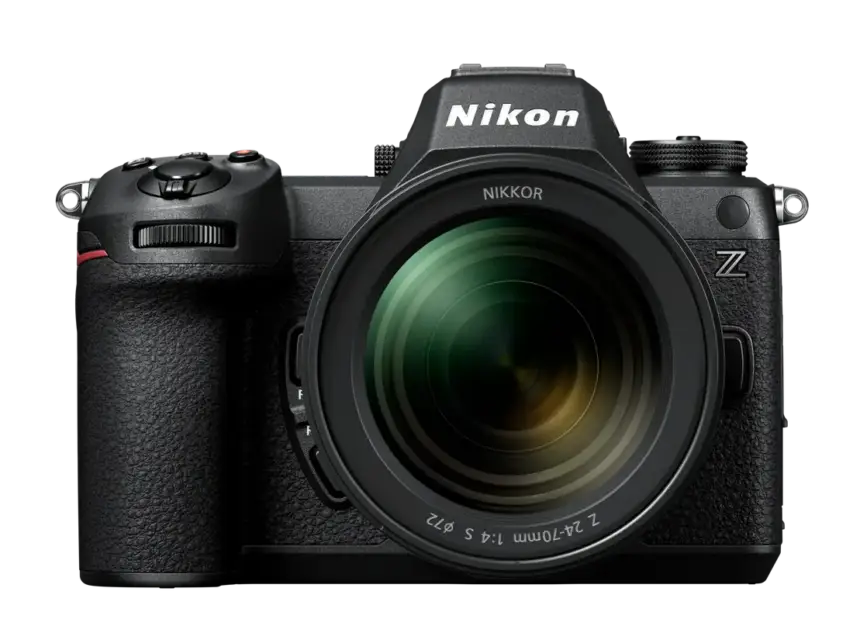

Plan the supporting items
Check the required memory-card type and any capacity or performance requirements in the camera instructions. Confirm how the battery charges and whether the necessary charger or power supply is included. Add a bag that fits the assembled equipment you intend to carry, rather than choosing solely from the camera body dimensions. Include any required filter size only after the exact lens has been selected.
A first-kit comparison
Imagine a shopper comparing a body with a standard kit lens against a different body sold alone. The first step is to price and specify a suitable lens for the second option. The next is to compare the combined size, intended use and included accessories. A more expensive body is not automatically the better complete first kit if the remaining budget cannot provide the lens needed for the planned photographs.
Prepare useful questions
Ask whether the proposed lens is supported directly, what charging equipment is supplied, which card specification is required, and whether the retailer can demonstrate the exact combination. Save the complete kit description and any answers that affect the purchase. When the order arrives, identify each model and accessory before packing it for the first outing. Learn the setup and handling instructions with ordinary practice photographs; this guide provides a shopping method rather than a tested ranking or a promise about image quality.
Your comparison worksheet
Keep one short record for each candidate. Resolve the details below from the current listing or a direct supplier answer before treating the options as equivalent. Leave an uncertain point clearly marked rather than filling it with an assumption.
- Identity: Exact body and lens models, with kit contents checked
- Compatibility: Manufacturer-confirmed mount relationship and any adapter's stated limitations
- Use: Intended subjects, carrying arrangement and the useful lens specification
- Support: Required card type, charging equipment and a bag fitting the kit
- Order: Complete usable setup compared with equivalent components at other retailers
Continue with the retailer information
Explore Wex Photo Video, Nikon, Jessops. These profiles provide a route to the official shops and their published service information. Use the exact product or order details from your worksheet when following those links, and confirm the current selected option before paying.
For more relevant retailers, browse our electronics shops directory. Compare businesses that genuinely serve this purchase, keeping differences in products and shopping arrangements visible rather than treating every retailer as interchangeable.
The official source below provides further product or ordering information. Read the details relevant to your selected item, and retain any supplier answer that materially changes the comparison.
Sources and checks
Continue reading
Buying guides
Action-camera bundles: separate the essentials from spare mounts
Action-camera bundles often look generous because several small accessories appear together.
Read the guideBuying guides
A tripod that travels: check the complete supported load
A tripod purchase involves the camera, its heaviest intended lens and the head that connects them to the legs.
Read the guide
Buying guides
A router or a mesh kit: map the rooms before buying more Wi-Fi
Poor Wi-Fi in one room does not immediately tell you which product to buy.
Read the guideEXPLORE THE DIRECTORY
Related shop profiles

Wex Photo Video
Wex Photo Video sells cameras, lenses, video equipment and supporting photographic accessories.

Nikon
Explore Nikon for Nikon cameras, NIKKOR lenses and photographic accessories. Compare product details, UK delivery and the published returns route.

Jessops
Jessops is a photography and imaging retailer selling cameras, lenses, video equipment and accessories through its website and store network.