
Buying guides
A mechanical keyboard: UK layout, switches and connection choices
A keyboard is a tool you will use repeatedly, so begin with the layout and tasks rather than its lighting.
Published Information checked
A keyboard is a tool you will use repeatedly, so begin with the layout and tasks rather than its lighting. List the keys you need every day: a number pad, function row, navigation cluster or shortcuts. Then record the operating systems and devices involved. A compact board can save desk space, but it may move familiar actions onto combinations you need time to learn.
Choose the physical layout deliberately
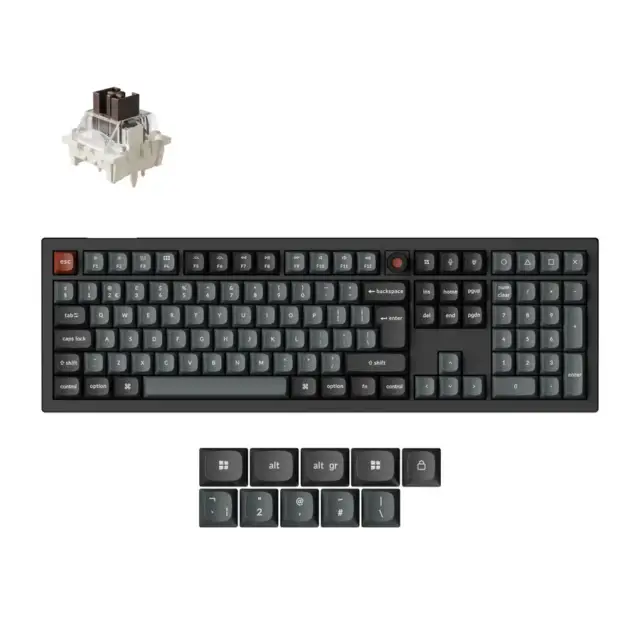
Check the actual layout shown for the selected variant. UK ISO and other layouts can place or shape keys differently. Look at the Enter key, left Shift and the legends on the keys you use for work. A product photograph may show a different regional option from the one selected in the menu. Keychron's official range offers layout and connectivity choices, making the exact variant an essential part of the order rather than a minor cosmetic detail.
Use the size in a real task
Imagine entering a spreadsheet, editing a document or using your normal application shortcuts. A smaller keyboard may replace dedicated keys with layers or function combinations. Read how those actions work on the specific model. Measure the board beside the mouse and consider the cable or receiver position. The best size is the one that leaves useful space without making your routine unnecessarily awkward.
Understand the switch choice
Read the manufacturer's description of the available switches and, if possible, try samples before choosing. Do not assume that every colour name has the same meaning across brands. Compare the described feel and sound with the environment where you will type. For a shared room, ask about the complete board rather than assuming one switch label determines the entire sound. ##Check what can actually be changed
A hot-swappable model and a soldered model create different replacement options. Confirm the supported switch type and any manufacturer limitations before buying spare switches. If choosing a barebones kit, list the missing components separately. A full keyboard in a lifestyle photograph does not prove that keycaps and switches are included. Check any tools needed and decide whether assembly is a task you want to take on.
Plan connections and remapping
Record whether you need wired use, a USB receiver, Bluetooth or several device profiles. Check the operating-system support for configuration software and whether the features you need require it. On a managed work computer, installation may be restricted. Read how settings are retained and how the board switches between devices. A feature advertised as customisable is useful only if the supported method fits your actual setup.
An order example
Suppose a shopper wants a UK layout, a number pad and a connection to two computers. One attractive compact board lacks dedicated number keys; another has them but uses a regional layout the shopper does not want. Keep both as alternatives until all three requirements are checked. Save the final layout, switch option, colour and supplied accessories with the order. On arrival, confirm those variants before making changes or discarding packaging, then practise the shortcuts that motivated the purchase.
Your comparison worksheet
Keep one short record for each candidate. Resolve the details below from the current listing or a direct supplier answer before treating the options as equivalent. Leave an uncertain point clearly marked rather than filling it with an assumption.
- Layout: Actual regional layout, important legends and the selected Enter-key shape
- Size: Dedicated keys needed for spreadsheets, editing or application shortcuts
- Switches: Manufacturer's switch description and any opportunity to try relevant samples
- Connection: Required modes, device switching and supported configuration software
- Contents: Complete keyboard or barebones kit, with missing components identified
Continue with the retailer information
Explore Keychron UK, Logitech, CORSAIR. These profiles provide a route to the official shops and their published service information. Use the exact product or order details from your worksheet when following those links, and confirm the current selected option before paying.
For more relevant retailers, browse our electronics shops directory. Compare businesses that genuinely serve this purchase, keeping differences in products and shopping arrangements visible rather than treating every retailer as interchangeable.
The official source below provides further product or ordering information. Read the details relevant to your selected item, and retain any supplier answer that materially changes the comparison.
Sources and checks
Continue reading

Buying guides
Choose a laptop for study: software, weight and working space
A useful study laptop starts with the course, not a processor badge.
Read the guideBuying guides
A home-office monitor: match the screen to your laptop and desk
A monitor should make your actual work easier to arrange.
Read the guide
Buying guides
A router or a mesh kit: map the rooms before buying more Wi-Fi
Poor Wi-Fi in one room does not immediately tell you which product to buy.
Read the guideEXPLORE THE DIRECTORY
Related shop profiles

Keychron UK
Keychron UK sells keyboards, mice and related parts and accessories.

Logitech
Logitech’s UK shop sells computer peripherals and related equipment for work, communication and gaming.

CORSAIR
CORSAIR’s UK shop sells PC components, gaming peripherals and other computer equipment.