
Buying guides
Soundbars: check the television connection and the whole speaker bundle
A soundbar purchase should begin behind the television.
Published Information checked
A soundbar purchase should begin behind the television. Find the exact television model and identify the audio connections it supports. Then decide whether you want a single bar, a bar with a separate subwoofer or a wider speaker arrangement. Similar product names and attractive room photographs can hide significant differences in what is included and how the system connects.
Read both devices' instructions
Compare the television's audio output with the soundbar's supported input. Where HDMI ARC or eARC is proposed, check the labelled sockets and the manufacturers' instructions for that arrangement. An ordinary HDMI input is not a substitute for every audio-return function. If using optical instead, confirm the supported features of both products. Write down the intended connection before comparing sound formats that the actual setup may not support.
Count the supplied components
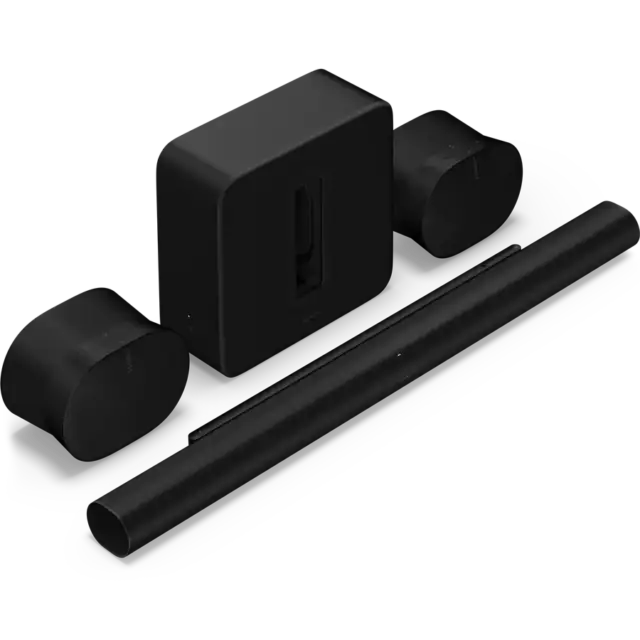
List the bar, subwoofer, rear speakers, remote, cables and mounts separately. A photograph can illustrate optional accessories rather than box contents. Read the exact retailer bundle description and save it with the model numbers. A manufacturer such as Sonos offers several kinds of home-audio product, but that does not mean every speaker can be combined in every role. Confirm compatibility for the specific arrangement you want to build.
Measure the room arrangement
Check the width and height of the bar against the television stand and screen. Mark a place for any separate subwoofer and note the nearby power socket. If adding rear speakers, plan their positions and power requirements as the manufacturer specifies. Wireless audio between components does not necessarily remove the need for power connections. Include those practical details before deciding that a larger bundle will be convenient in the room.
Think about everyday controls
Find out how volume, input switching and television power will work in the proposed setup. Check whether an application, account or network connection is required for the features you value. If different household members use the television, consider how they will select ordinary programmes or change sources. A technically impressive system can be frustrating if the everyday sequence is unclear or relies on a phone that is not always available.
A bundle comparison example
Imagine two listings for the same soundbar family. One includes only the bar; the other includes a particular subwoofer. A third retailer shows rear speakers in a lifestyle photograph but does not list them as included. Make a component table before comparing the totals. If rear speakers are important, add the exact compatible pair to every candidate that lacks them. If they are not important, avoid treating their presence as an automatic reason to spend more.
Ask for a demonstration with a purpose
Where a retailer offers demonstrations, explain the equipment you own and the listening arrangement at home. Listen to ordinary dialogue as well as dramatic film clips, and ask which settings or extra components are involved. It helps establish whether the complete system will work with your television and room. Save the final component list, connection plan and retailer service details so that the delivered boxes can be checked against a clear order.
Your comparison worksheet
Keep one short record for each candidate. Resolve the details below from the current listing or a direct supplier answer before treating the options as equivalent. Leave an uncertain point clearly marked rather than filling it with an assumption.
- Connection: Television audio output and the soundbar's documented supported input
- Contents: Exact bar, subwoofer, rear speakers and any supplied cables
- Placement: Bar clearance, extra-speaker positions and the available power sockets
- Operation: Everyday volume control, input selection and any required application
- Comparison: Identical useful components and services in each final retailer basket
Continue with the retailer information
Explore Sonos, Richer Sounds, Bose. These profiles provide a route to the official shops and their published service information. Use the exact product or order details from your worksheet when following those links, and confirm the current selected option before paying.
For more relevant retailers, browse our electronics shops directory. Compare businesses that genuinely serve this purchase, keeping differences in products and shopping arrangements visible rather than treating every retailer as interchangeable.
The official source below provides further product or ordering information. Read the details relevant to your selected item, and retain any supplier answer that materially changes the comparison.
Sources and checks
Continue reading

Buying guides
Television size: measure the stand, wall and viewing arrangement
A television's screen diagonal is only one part of its fit.
Read the guide
Buying guides
A router or a mesh kit: map the rooms before buying more Wi-Fi
Poor Wi-Fi in one room does not immediately tell you which product to buy.
Read the guideBuying guides
A home-office monitor: match the screen to your laptop and desk
A monitor should make your actual work easier to arrange.
Read the guideEXPLORE THE DIRECTORY
Related shop profiles

Sonos
Sonos’s UK direct shop focuses on speakers, soundbars and related home-audio products.

Richer Sounds
Richer Sounds specialises in televisions, hi-fi and home cinema, with local stores and demonstration spaces. It suits shoppers who want to compare complete entertainment systems as well as individual components.

Bose
Bose’s UK shop sells the brand’s headphones, earbuds, portable speakers and home-audio equipment.